
Where bookings come from
- Your AI chat agent, from the widget on your website.
- Your AI voice agent, during a phone call or a web call.
- You, manually, from the Bookings page.
- A connected booking system, if you use one.
Everything lands in the same place: Bookings in the sidebar, as a list or a calendar. Open a booking to see the details, take payment, check the customer in, or cancel.
What each status means
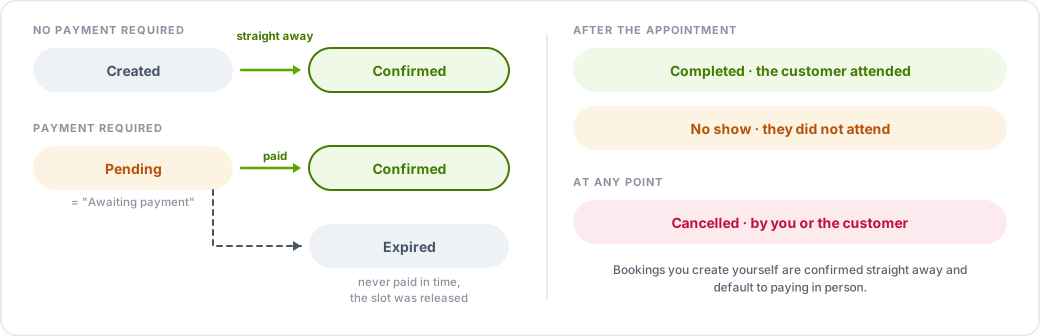
- Pending — created and waiting on payment. Shown as Awaiting payment when payment is due.
- Confirmed — locked in.
- Cancelled — cancelled by you or by the customer.
- Completed — the customer attended.
- No show — the customer did not attend.
- Expired — payment was required and never completed in time, so the slot was released.
When a booking is confirmed automatically
If no payment is required, a booking is Confirmed as soon as it is created. Bookings you create yourself from the dashboard are confirmed straight away and default to paying in person.
If payment is required, the booking starts as Pending and becomes Confirmed the moment payment succeeds. You can also mark it as paid manually, which confirms it.
Payments
Taking payment at the time of booking requires Stripe connected to your account. What happens then depends on your rules in Settings → Booking Management — see Booking rules, deposits and cancellations.
Online payment applies to bookings made through the chat or voice agent. Bookings you enter yourself default to paying in person unless you change it.
Bookings and your calendar
If Google Calendar is connected, confirmed bookings are written to it and the agent checks it for availability. If it is not connected, bookings live only in TalkRev.