
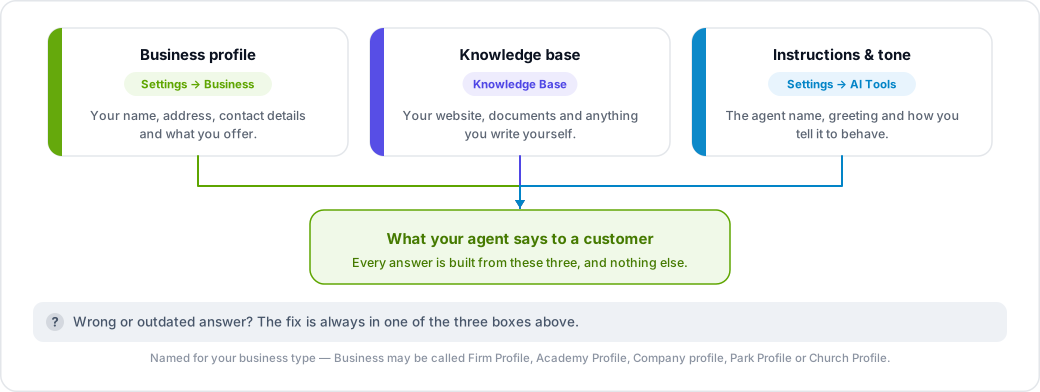
Everything lives under Settings → AI Tools, which has one tab for chat and one for voice. Changes to one do not affect the other — if you want the same tone everywhere, set it in both.
Chat agent
Open the AI Chat Agent tab:
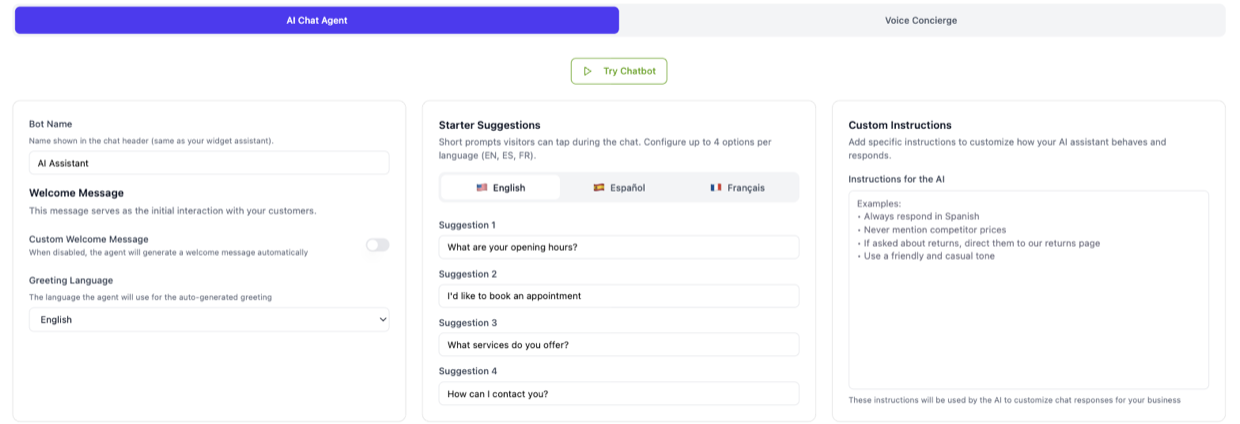
- Bot Name — the name shown in the widget header.
- Welcome Message — write your own, or let TalkRev generate one and simply pick a Greeting Language.
- Starter Suggestions — the clickable prompts a visitor sees before typing. You can set them per language (English, Spanish, French).
- Custom Instructions — free text telling the agent how to behave.
- Appearance — colours, theme (Auto, Light or Dark) and the widget avatar.
Click Try Chatbot to talk to your agent with the new settings before you save them for visitors.
Voice agent
Open the Voice Concierge tab:
- Custom Instructions — how the assistant should behave on a call.
- Welcome Message — set per phone line, and per language for web calls.
- Voice and emotion settings.
- Call Transfer Settings — when and where to hand a call to a person.
Writing good custom instructions
Custom instructions work best as short, concrete rules. For example:
- "Use a friendly, casual tone. Keep answers to two sentences where possible."
- "Always ask for a phone number before confirming a booking."
- "If someone asks about refunds, tell them to email accounts@example.com."
- "Never quote a price for custom work — offer to book a call instead."
What you cannot change
Your instructions are added to TalkRev's base prompt, not a replacement for it. Core behaviour — replying in the customer's language, reading numbers aloud correctly on calls, how booking and calendar tools are used — is managed by TalkRev and is not editable from the dashboard.
There is no "tone" dropdown and no model or temperature setting in the dashboard. Tone is set by writing it into Custom Instructions.
Facts come from somewhere else
Opening times, address, services and prices are not set here. They come from Settings → Business, Settings → Operating Hours and your Knowledge Base. Your agent uses them automatically — you do not need to repeat them in the instructions.